How to Prevent Fraud When Selling Digital Products
Learn how to reduce fraud when selling digital products by securing your checkout, monitoring suspicious orders, protecting download links, setting clear policies, and using automated delivery safely.
How to Prevent Fraud When Selling Digital Products
Selling digital products online is fast and scalable, but it also comes with fraud risks. Because files, software keys, subscriptions, templates, and access credentials can be delivered instantly, sellers need to protect their store before a fraudulent order turns into a loss.
The good news is that most fraud prevention does not need to make checkout difficult for legitimate customers. With clear product rules, secure payment flows, sensible delivery settings, and regular order monitoring, digital sellers can reduce risk while keeping the buying process simple.
This guide explains practical ways to prevent fraud when selling digital products, subscriptions, software licenses, access keys, downloads, and online services.
Why Digital Products Are a Target for Fraud
Digital products are valuable because they can be delivered immediately. A customer may receive a file, license key, private link, account access, or subscription within seconds of payment confirmation.
This speed is useful for legitimate customers, but it can also attract people who try to exploit weak checkout processes, stolen accounts, leaked download links, refund abuse, or unauthorized sharing.
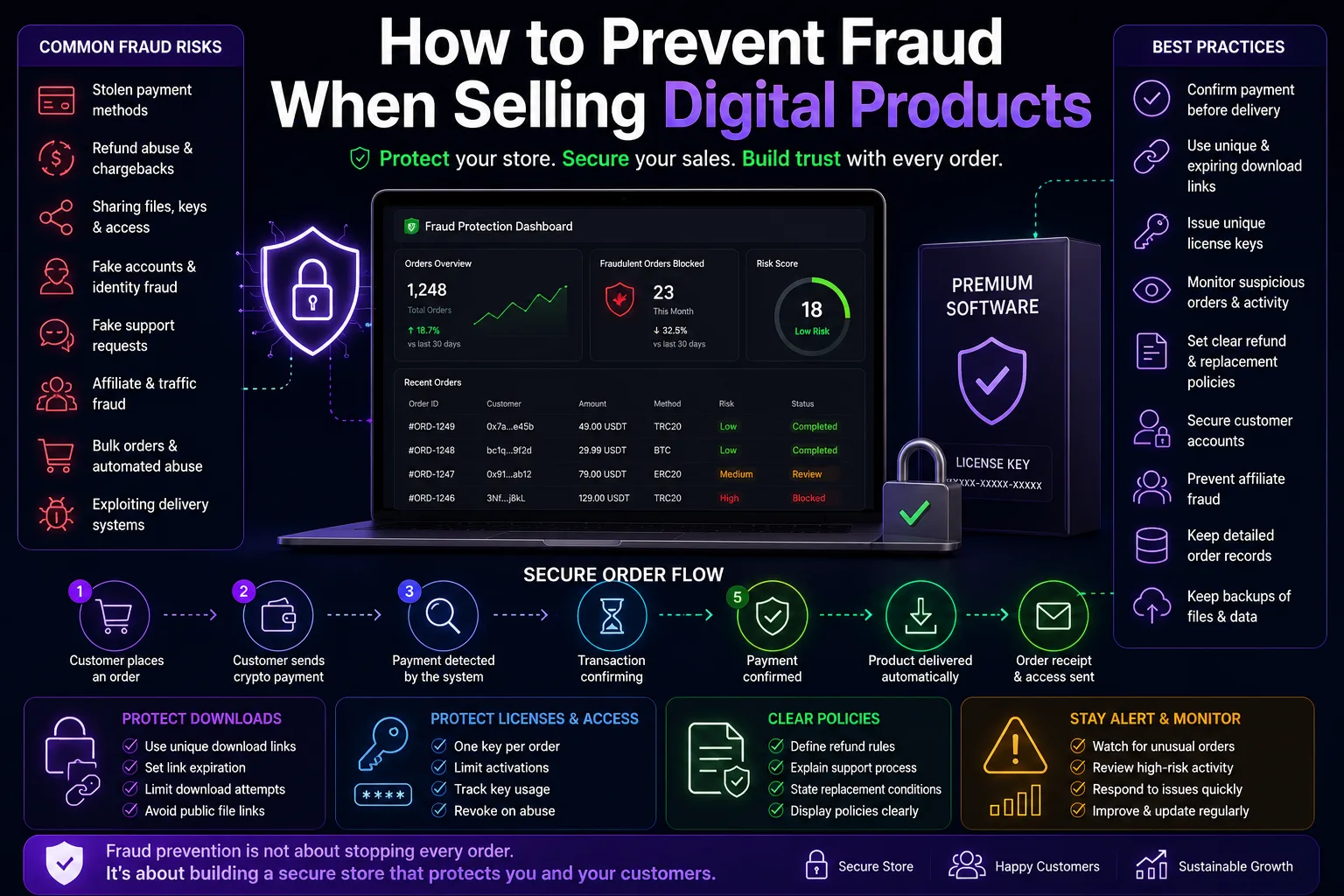
Common fraud risks for digital sellers include:
- Stolen or unauthorized payment attempts
- Refund abuse after a product has already been delivered
- Sharing download links, files, or access credentials
- Using stolen or compromised customer accounts
- Fake support requests to obtain replacement keys or access
- Affiliate fraud and fake referral traffic
- Bulk purchases that look suspicious or automated
- Attempts to exploit product delivery systems
Use a Secure Checkout Process
Your checkout process is the first place to reduce fraud. Customers should clearly see what they are buying, how much they need to pay, and what happens after payment.
A secure checkout should include:
- Accurate product prices
- Clear payment instructions
- Unique order references
- Payment status updates
- Transaction confirmation before delivery
- Protected account access
- Order records for support and review
Avoid manually approving payments based only on screenshots, messages, or claimed transaction details. Products should only be delivered after your payment system confirms that the payment is complete.
Wait for Payment Confirmation Before Delivery
One of the most important rules for crypto-based digital stores is simple: do not deliver the product until the payment has been detected and confirmed by your system.
A transaction may appear in a wallet or on a blockchain explorer before it is fully confirmed. Your store should use a clear confirmation flow so automatic delivery only happens once the payment reaches the required status.
Clear payment statuses can help both sellers and customers understand what is happening:
- Waiting for payment
- Payment detected
- Transaction confirming
- Payment confirmed
- Order delivered
Protect Download Links and Product Files
A public download link can easily be shared, reposted, or used by people who never purchased your product. Instead of using one permanent public link, use delivery methods that give each customer controlled access.
Good protection methods include:
- Unique download links for each order
- Links that expire after a set period
- Download limits per customer
- Account-based access for premium products
- Watermarking where appropriate
- Private file storage instead of public file URLs
- Separate access credentials for each customer
These measures do not stop every form of sharing, but they make unauthorized distribution harder and help you identify where a leak may have started.
Protect License Keys and Access Credentials
If you sell software keys, account access, activation codes, or private memberships, each customer should receive unique credentials whenever possible.
Avoid reusing the same key or access link for many customers. Shared credentials are difficult to control and make it easier for one purchase to be copied across many users.
You can reduce abuse by:
- Assigning one license key per order
- Limiting activations per key
- Tracking key usage where possible
- Allowing customers to view their own purchase history
- Replacing keys only after verifying the original order
- Suspending access when clear abuse is detected
Watch for Suspicious Orders
Not every unusual order is fraudulent, but some patterns deserve extra attention. Sellers should review orders that look unusually large, repetitive, rushed, or inconsistent with normal customer behavior.
Examples of suspicious activity can include:
- Many orders placed in a short time
- Repeated failed payment attempts
- Multiple accounts using similar information
- Large purchases from a new customer with no history
- Repeated requests for replacement files or keys
- Orders linked to known spam or abuse activity
- Unusual affiliate conversions with no real engagement
Create a simple review process for high-risk orders. For example, you may decide to manually review unusually large purchases before granting account-based access or issuing high-value license keys.
Use Clear Refund and Replacement Rules
Fraud prevention becomes much easier when customers understand your policies before they buy. Your product pages and checkout flow should clearly explain how refunds, replacements, and support requests work.
Your policy should explain:
- Whether digital products are refundable after delivery
- When a replacement key or file can be issued
- What proof is needed for support requests
- How long customers have to report an issue
- How refunds are reviewed
- What happens if an order has already been accessed or downloaded
Avoid vague rules. Clear policies protect legitimate customers while making it harder for bad actors to claim repeated refunds, replacements, or free access.
Secure Customer Accounts
If your store allows customer accounts, account security should be treated seriously. A compromised account can expose purchase history, private downloads, saved access credentials, and support messages.
Basic account protection can include:
- Strong password requirements
- Email verification
- Password reset protections
- Rate limits for login attempts
- Session management tools
- Alerts for unusual account activity
- Optional two-factor authentication where available
Sellers should also be careful when handling support requests. Do not change account ownership or send sensitive information unless the customer can verify the original purchase or account details.
Prevent Affiliate Fraud
Affiliate programs can grow your store, but they can also attract fake traffic, self-referrals, misleading promotions, and low-quality sales. Set clear affiliate rules before launching a program.
Your affiliate rules should clearly ban:
- Fake clicks or automated traffic
- Self-referrals for commission abuse
- Misleading product claims
- Fake discount codes
- Spam messages and unsolicited outreach
- Unauthorized paid advertising using your brand name
- Fake reviews or testimonials
Track which affiliates generate real sales, low refund rates, and high-quality customers. A smaller group of trusted affiliates is often better than a large group of unreviewed partners.
Keep Records of Orders and Support Requests
Good records make fraud investigations much easier. Keep order details, delivery history, support messages, refund requests, license assignments, and relevant transaction references in one place.
This helps you respond fairly when a customer says they did not receive a product, lost access, or received the wrong item.
Important records can include:
- Order ID
- Product purchased
- Payment status
- Transaction reference
- Delivery time
- Download history
- License key assignment
- Customer support messages
- Refund or replacement decisions
Do Not Rely on One Platform or System
Fraud prevention also includes protecting your business from technical issues. Keep backups of product files, license keys, store content, customer communication, and order records.
Your business should be able to continue operating if a platform experiences downtime, an account is restricted, or a delivery system fails. Maintaining backups and control over your domain helps protect your store in the long term.
Common Mistakes to Avoid
Digital sellers often create unnecessary risk by making simple mistakes. Avoid the following:
- Delivering products before payment confirmation
- Using public permanent download links
- Reusing the same access credentials for every customer
- Handling important support requests only through informal messages
- Offering unclear refund rules
- Ignoring suspicious order activity
- Accepting every affiliate without basic review
- Keeping no backups of products or order data
Final Thoughts
Fraud prevention is not about making every customer prove themselves before buying. It is about creating a secure system that protects your products, your revenue, and legitimate customers.
Start with the basics: confirm payments before delivery, secure download links, use unique license keys, keep clear policies, monitor suspicious activity, and maintain strong order records.
With the right setup, you can offer fast digital delivery while reducing avoidable fraud risks and building a more reliable store for your customers.